Integrated Software Ecosystem for Packaging
Automate design processes, optimize logistics, and precisely quote production with our dedicated B2B tools.
Our B2B Solutions
CalcPack
CalcPack is a professional environment and B2B platform designed for the instant and highly precise pricing of cardboard packaging. The application automates the complex quoting process, enabling packaging manufacturers and distributors to generate accurate cost calculations in real time.Key features of the system:Instant Quoting: Rapid generation of price offers based on specific parameters such as dimensions, box style (e.g., FEFCO standards), cardboard grade, and printing options.High Precision Calculations: Advanced algorithms accurately factor in raw material costs, production processes, markups, and margins, completely eliminating the risk of human error in pricing.Sales Workflow Optimization: The tool significantly reduces the turnaround time for customer inquiries, enhancing the efficiency and professionalism of the sales department.
Learn morePaletyzer
Paletyzer is an advanced analytical and logistics tool designed to maximize the efficiency of transportation and warehousing. The application automates the process of planning product layouts on pallets and precisely calculates packaging strength, ensuring the absolute safety of the entire cargo load.Key features of the system:Advanced Spatial Optimization: The algorithm generates the most efficient stacking patterns for boxes on a pallet, maximizing volume utilization and significantly reducing shipping costs.BCT (Box Compression Test) Calculation: The system dynamically calculates the static crush resistance of corrugated boxes stacked on top of each other. This ensures that the bottom layers of the load will not collapse under the weight of the upper tiers.Cargo Safety and Stability: Through precise calculations of physical parameters and optimal weight distribution, the application drastically minimizes the risk of product damage during transit and storage.
Learn moreDielineo
Dielineo is an industry-specific CAD program developed exclusively for drawing and generating packaging dielines. Positioned as a modern and highly capable alternative to expensive, market-leading CAD systems, it provides packaging engineers and designers with a comprehensive and tailored workspace.Key features of the system:Precision CAD Design: A suite of intuitive drafting tools dedicated strictly to the packaging industry, allowing for the creation and parametric generation of complex cardboard dielines.Macro-Driven Automation: An advanced macro-building system enables users to automate repetitive design workflows and structural modifications, significantly speeding up the development of new packaging.Interactive 3D Visualization: A built-in 3D module allows the 2D dieline to be instantly folded into a spatial model. This facilitates immediate structural verification, early error detection prior to physical prototyping, and professional project presentation to clients.
Learn moreLogiPack
Logipack is a logistics application designed to automate and optimize the order packing process. The software analyzes the dimensions of all items within a single customer order and matches them against a predefined set of available boxes (approximately 10 standard sizes).Key features of the system:Smart Box Selection: The algorithm accurately identifies the specific box size required for each order.Spatial Optimization: The application suggests the most efficient spatial arrangement of products inside the carton to maximize the use of available space.Time and Cost Efficiency: By eliminating the trial-and-error approach to packing, the solution minimizes the need for void fill materials and reduces overall shipping costs through better volume utilization.
Learn moreSlicer 3D
3D Slicer by KUMIBOX is a free, fully browser-based tool that enables the instant conversion of any 3D models (STL files) into physical, cardboard spatial structures (waffle structures). The application automates the complex process of designing interlocking planes, eliminating the need for costly and time-consuming manual slot drafting in CAD systems.Key features of the system:From 3D Solid to Flat Grid: Within seconds, the algorithm analyzes the volume of the solid and generates precise cutting paths for horizontal (X) and vertical (Y) slices.Full Parameterization: The user has complete control over grid density (detail resolution), model scale, and material thickness. The system precisely adjusts slot widths, allowing for the creation of stable, friction-fit structures without the use of glue.Production Ready (DXF Export): The tool generates clean DXF vector files, optimized for cutting plotters (e.g., Kongsberg, Zünd) and laser cutters. The generated layouts can be directly imported into the Dielineo system for seamless editing and integration with other packaging designs.
Learn moreStangretPRO
StangretPRO by KUMIBOX is a fleet compliance and dispatch platform designed to protect transport carriers from ITD penalties (up to 12,000 PLN) and total OCP insurance recourses. It automates regulatory driver audits and fleet maintenance deadlines. Key features of the system:Direct CEPiK Audit (mTLS): Instant driving license and ban validation in the state CEK database (Art. 100ar) using authenticated .p12 company certificates.Unified Fleet & Driver Records: Centralized monitoring of medical tests, Code 95, psychotests, ADR, tachograph calibrations, UDT tail-lift inspections, and ATP reefer certifications.Proactive Alerts & Automation: Automated SMS notifications and morning email digests before expirations, bulk CSV/Excel onboarding, and installable PWA access on mobile and desktop.
Learn moreLatest Updates
Weryfikacja kierowców w CEPiK i nadzór floty – StangretPRO ▼
Cześć! Tu KUMIBOX. Polskie prawo transportowe nie wybacza zaniedbań. Wypuszczenie w trasę kierowcy z zatrzymanym prawem jazdy lub nieważnymi badaniami to nie tylko mandat ITD do 12 000 zł, lecz przede wszystkim widmo 100% regresu ubezpieczeniowego OCP/AC w razie wypadku. Dzisiaj sprawdzamy, jak zautomatyzować audyt uprawnień i nadzór nad flotą. StangretPRO: System Dyspozytorski, Audyt Uprawnień […]
Cześć! Tu KUMIBOX.
Polskie prawo transportowe nie wybacza zaniedbań. Wypuszczenie w trasę kierowcy z zatrzymanym prawem jazdy lub nieważnymi badaniami to nie tylko mandat ITD do 12 000 zł, lecz przede wszystkim widmo 100% regresu ubezpieczeniowego OCP/AC w razie wypadku. Dzisiaj sprawdzamy, jak zautomatyzować audyt uprawnień i nadzór nad flotą.
StangretPRO: System Dyspozytorski, Audyt Uprawnień CEPiK mTLS i Pełny Nadzór Floty
Nadzór nad terminami orzeczeń lekarskich, psychotestów, szkoleń okresowych (Kod 95), 2-letniej legalizacji tachografów, dozorów UDT wind załadowczych czy certyfikatów ATP chłodni przypomina w firmach transportowych syzyfową pracę. Tradycyjne segregatory i arkusze Excel zawsze zawodzą w krytycznym momencie – np. gdy kierowca straci uprawnienia w weekend i zatai ten fakt przed dyspozytorem.
Dlatego stworzyliśmy StangretPRO. To nowoczesny system dyspozytorski dla branży TSL, zintegrowany bezpośrednio z państwowym węzłem CEPiK (SI UpKi) na mocy art. 100ar Ustawy Prawo o ruchu drogowym.

1. Automatyczny Audyt w Bazie CEPiK (SI UpKi) przez mTLS
Zgodnie z art. 100ar PoRD licencjonowane firmy transportowe mają pełne prawo weryfikować dokumenty kierowców w Centralnej Ewidencji Kierowców. StangretPRO eliminuje konieczność ręcznego sprawdzania i ryzyko domysłów.
Jak to działa: Dyspozytor wprowadza imię, nazwisko oraz serię i numer blankietu prawa jazdy. Aplikacja zestawia bezpieczną sesję SOAP mTLS z węzłem Centralnego Ośrodka Informatyki (COI) przy użyciu firmowego certyfikatu PKCS#12 (.p12), zabezpieczonego szyfrowaniem AES-256. W ułamku sekundy system weryfikuje ważność blankietu w CEK, aktywne zakazy, zatrzymania oraz nadane kategorie pojazdów.
2. Kompletna Dyspozytornia w Jednym Ekranie
Codzienna logistyka wymaga równoczesnego nadzoru nad ludźmi, sprzętem i twardymi terminami prawnymi. StangretPRO łączy wszystkie te obszary w intuicyjnym panelu dyspozytorskim.
- Kadry i Kwalifikacje: Monitoring badań lekarskich, psychotestów, Kodu 95, uprawnień ADR oraz dat ważności kart kierowcy do tachografu.
- Flota i Park Maszynowy: Ewidencja ciągników, naczep (chłodnie z datami ATP i F-Gaz), okresowych badań technicznych, legalizacji tachografów oraz wind załadowczych podlegających UDT.
- Alerty SMS i Raporty E-mail: Zintegrowana bramka SMSAPI wysyła powiadomienia SMS bezpośrednio na telefon dyspozytora ze zdefiniowanym wyprzedzeniem (np. 30 dni), uzupełnione o codzienne poranne zestawienia e-mail.
- Import CSV i Eksport XML: Błyskawiczne dodawanie kierowców z gotowego szablonu Excel/CSV oraz ustrukturyzowany eksport bazy floty do formatu XML (
<CepikFleetExport>). - Wielodostęp, PWA i RODO: Role w zespole (Admin, Dyspozytor, Podgląd), pełny rejestr operacji (Audit Log) oraz aplikacja PWA gotowa do instalacji na smartfonach (iOS/Android) i komputerach.
3. Skalowalne Pakiety od Mikrofloty po Duży Transport
Zapewniamy przejrzyste zasady współpracy. Mikroprzedsiębiorcy otrzymują Pakiet DARMOWY na zawsze (do 5 kierowców i 5 pojazdów z pełną weryfikacją w CEPiK mTLS). Dla większych przewoźników przygotowaliśmy pakiety EXTRA i PRO (do 100 pojazdów i kierowców, subkonta dyspozytorów, bramka SMS oraz wsparcie przy wnioskowaniu o certyfikat w COI), ze zintegrowanymi płatnościami online Stripe i automatycznymi fakturami w KSeF.
Zabezpiecz firmę przed karami inspekcji i odzyskaj cenny czas pracy dyspozytorni już dziś.
Pamiętaj: Bezpieczeństwo prawno-administracyjne to fundament stabilności w transporcie – jedno sprawdzenie w rejestrze potrafi uchronić firmę przed setkami tysięcy złotych regresu.
Kontroluj flotę z głową!
— Zespół KUMIBOX
Logipack: 3D Bin Packing Software to Master EU PPWR Regulations ▼
Hi! This is KUMIBOX. E-commerce logistics is changing. Shipping “air” in oversized boxes is no longer just a financial loss—it will soon be a regulatory violation. Today, we are diving into smart packaging optimization. Logipack: 3D Bin Packing Software to Master EU PPWR Regulations The EU’s Packaging and Packaging Waste Regulation (PPWR) is just around […]
Hi! This is KUMIBOX.
E-commerce logistics is changing. Shipping “air” in oversized boxes is no longer just a financial loss—it will soon be a regulatory violation. Today, we are diving into smart packaging optimization.
Logipack: 3D Bin Packing Software to Master EU PPWR Regulations
The EU’s Packaging and Packaging Waste Regulation (PPWR) is just around the corner, demanding strict limits on empty space ratio in e-commerce shipments. If your warehouse still relies on guesswork to pick shipping boxes, you risk compliance penalties and wasted resources.
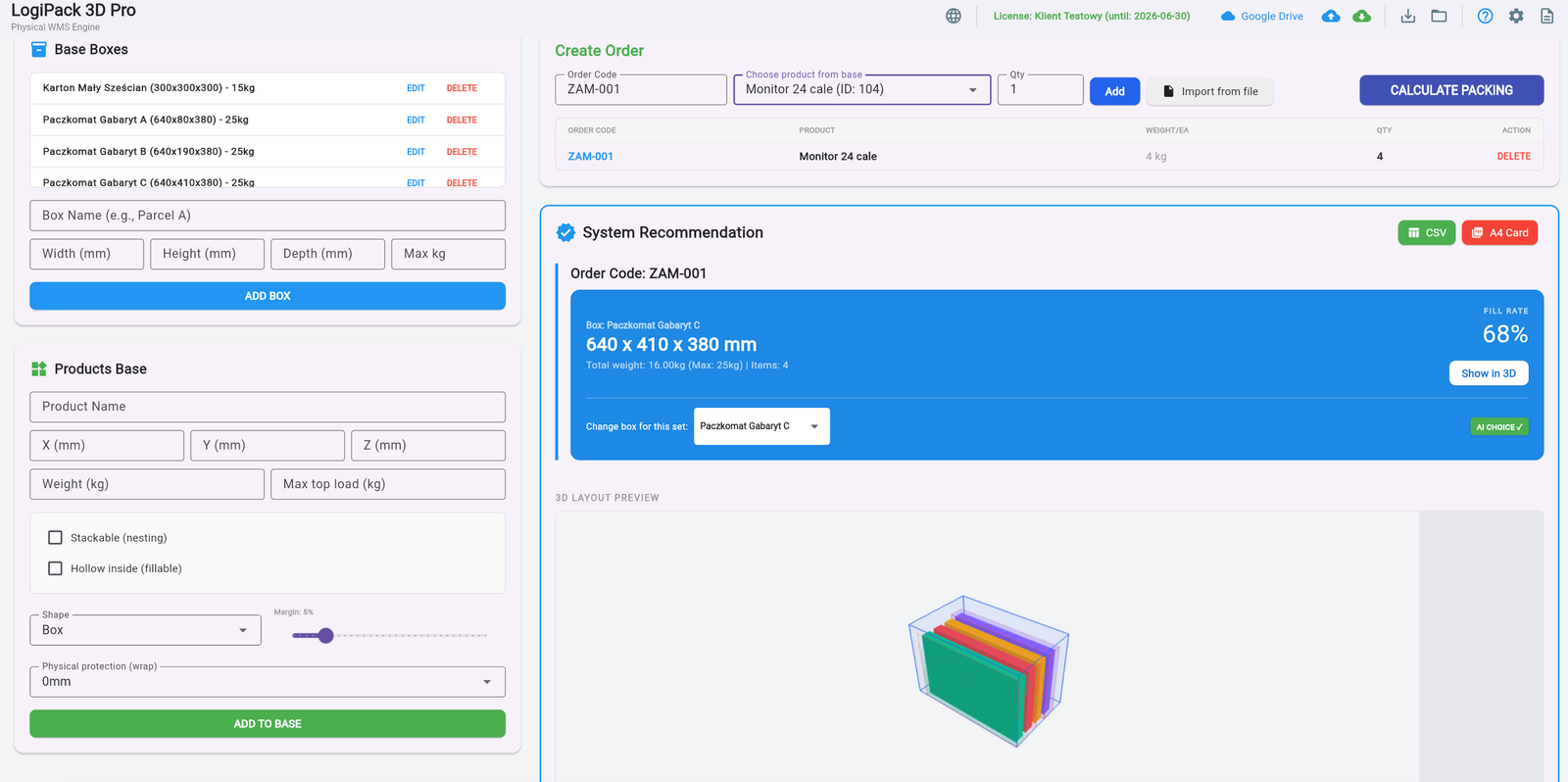
That is why we built Logipack. It is an automated software solution designed to select the absolute best box for multi-item orders and streamline your dispatch process.

1. How Logipack Optimizes Your Warehouse
Imagine your company restricts its inventory to just 5 standard box sizes to save on procurement. When a customer orders a complex mix of products, finding the smallest possible box that fits everything is a geometric puzzle.
How it works: The system analyzes the volume and dimensions of the ordered goods. It instantly evaluates your predefined list of boxes and selects the one that maximizes fill rate. To complete the workflow, Logipack automatically generates the shipping labels.
2. Advanced Product Nesting
Real-world products aren’t always perfect cubes. We engineered Logipack to understand complex geometries, which is crucial for maximizing space.
- Smart Nesting: The algorithm recognizes when items can be stacked inside one another (like flower pots, buckets, or cones).
- Space Maximization: By calculating the nested dimensions, Logipack prevents unnecessary upgrades to larger boxes.
- Reduced Fillers: A tighter fit means less need for bubble wrap, void fill, or structural supports.
3. Ready for the PPWR Era
The upcoming PPWR mandates a maximum empty space ratio for transport packaging. Logipack transforms this legal requirement into a logistical advantage. By consistently picking the optimal box, you naturally comply with the law, reduce your carbon footprint, and significantly cut down on courier fees.
Stop guessing and start optimizing. Implement logic into your packing process today.
Remember: Every cubic centimeter of saved space is a win for your budget and the planet.
Pack smarter!
— The KUMIBOX Team
Leave a Reply
You must be logged in to post a comment.
3D Slicer: How to Turn Any STL Model into Interlocking Cardboard Structures ▼
Hi! This is KUMIBOX. We often talk about square boxes, but sometimes creativity demands organic shapes. Today, we are exploring the intersection of 3D modeling and cardboard engineering. 3D Slicer: How to Turn Any STL Model into Interlocking Cardboard Structures Imagine you need to create a spectacular Point of Sale (POS) display shaped like a […]
Hi! This is KUMIBOX.
We often talk about square boxes, but sometimes creativity demands organic shapes. Today, we are exploring the intersection of 3D modeling and cardboard engineering.
3D Slicer: How to Turn Any STL Model into Interlocking Cardboard Structures
Imagine you need to create a spectacular Point of Sale (POS) display shaped like a giant bottle, or maybe a decorative cardboard reindeer for a holiday window. You have the 3D model, but how do you build it out of flat sheets of corrugated board?
The answer is the “Waffle Structure” (or interlocking grid). It looks amazing and is incredibly strong. But manually drawing hundreds of intersecting slots in CAD? That is a nightmare that takes days. That’s why we built our free Slicer 3D tool.
1. From Virtual Solid to Physical Layers
Usually, to create a grid structure, you need expensive plugins for architectural software. Our tool brings this capability directly to your browser for free. It takes a standard 3D file (STL) and slices it into interlocking X and Y planes.
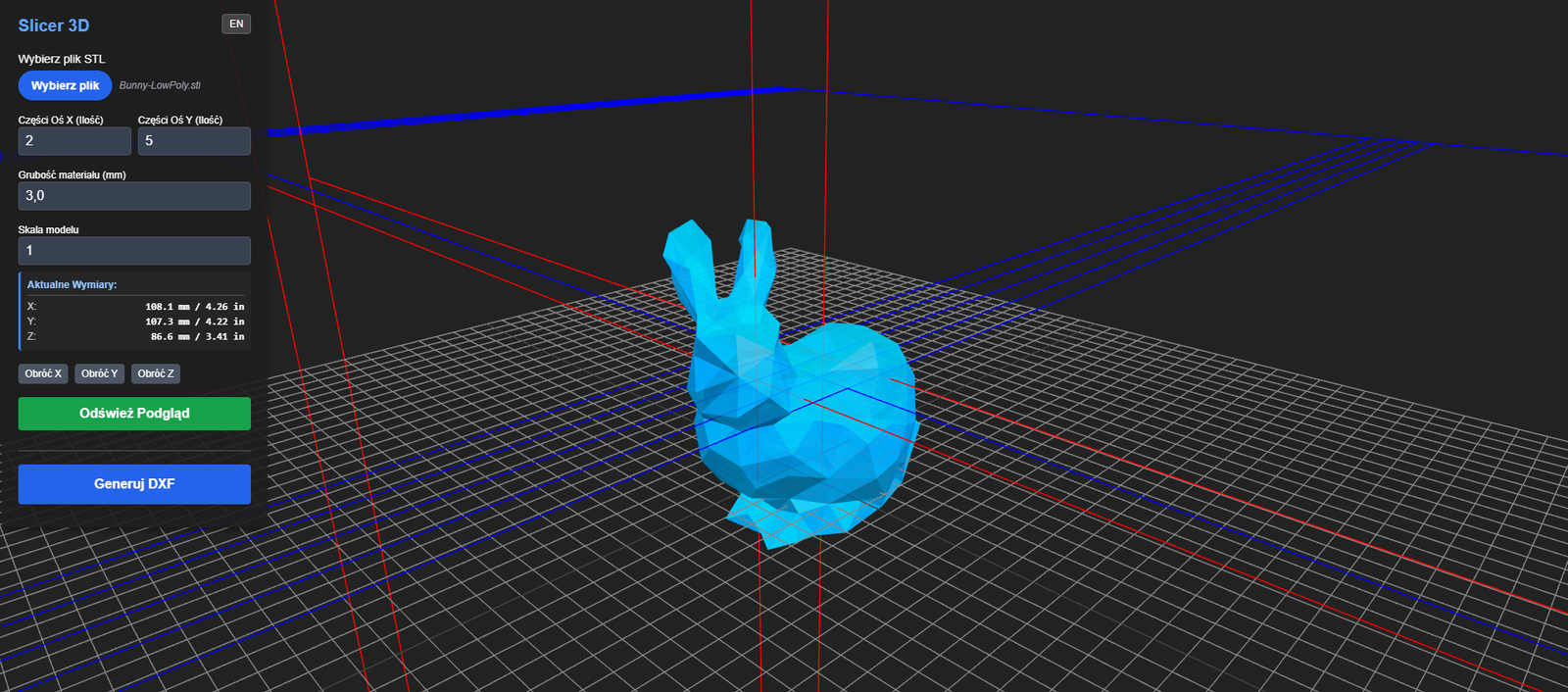
How it works: Upload your .STL file. The algorithm analyzes the volume and automatically generates the cutting paths for horizontal and vertical slices, including the crucial connecting slots.
Within seconds, you go from a digital blob to a ready-to-cut construction kit.
2. Key Features for Packaging Designers
We designed this with the plotter table in mind. Here is what you can control:
- Material Thickness: This is the most important setting. If your cardboard is 3mm thick (B-flute), set this to 3mm. The tool will automatically adjust the slot width so the pieces fit together snugly without glue.
- Slice Density (X & Y): Want a detailed, high-resolution model? Increase the number of slices. Want a minimalist, abstract look? Reduce them.
- Scale & Rotation: Is your model too big for your plotter? Scale it down directly in the tool. You can also rotate the object to find the most stable orientation.
3. Pro-Tip: The “Slot Tolerance” Trick
Here is a tip from our workshop. When laser cutting or plotting cardboard, the material can sometimes compress or burn away slightly (kerf).
If your 3mm cardboard feels loose in a 3mm slot, try setting the “Material Thickness” in the tool to 2.8mm or 2.9mm. This creates a tighter “interference fit,” making your final structure rigid and sturdy without needing tape or hot glue.
4. Instant DXF Export & Editing
Once you are happy with the preview, hit “Generate DXF”. You get clean vector files ready for your Kongsberg, Zünd, or laser cutter.
Need further tweaks? You can take your generated DXF straight into Dielineo.com. It’s our dedicated online vector editor where you can clean up paths, add custom cutouts, or combine the slices with other packaging designs seamlessly.
Stop fighting with geometry. Upload your model and let the math do the hard work.
Remember: Even flat cardboard has a 3D soul.
Stay creative!
— The KUMIBOX Team
Leave a Reply
You must be logged in to post a comment.
Start Collaborating
Contact us to prepare a personalized implementation quote or to schedule a technical presentation of our systems.
Contact B2B Sales →After Hours
Beyond providing advanced industrial software, we passionately develop our own mobile and social projects in our free time.
Leave a Reply
You must be logged in to post a comment.